
TL;DR
Ergonomic laptop stands improve posture, cut down neck and eye strain, and boost productivity. Recent innovations include smart adjustability and eco-friendly materials, making them more versatile than ever.
Ever feel like your neck is protesting after hours hunched over your laptop? That aching pain isn’t just annoying — it’s a sign your workspace needs a serious upgrade. Ergonomic laptop stands aren’t just fancy accessories; they’re game-changers for your health and focus.
In this article, you’ll learn how these stands support your posture, recent innovations making them smarter and more eco-friendly, and tips to pick the perfect one for your setup. Get ready to turn your desk into a comfortable, efficient zone that respects your body’s limits.
Choose a stand with adjustable height and tilt to customize your ergonomic setup.
Materials like aluminum and bamboo offer durability and eco-friendliness.
Recent innovations include motorized adjustments and built-in cooling fans.
Compare features and prices using a simple table to find your best fit.
Prioritize your workspace needs—portability, compatibility, and comfort.
What Makes a Laptop Stand Truly Ergonomic — And Why It Matters
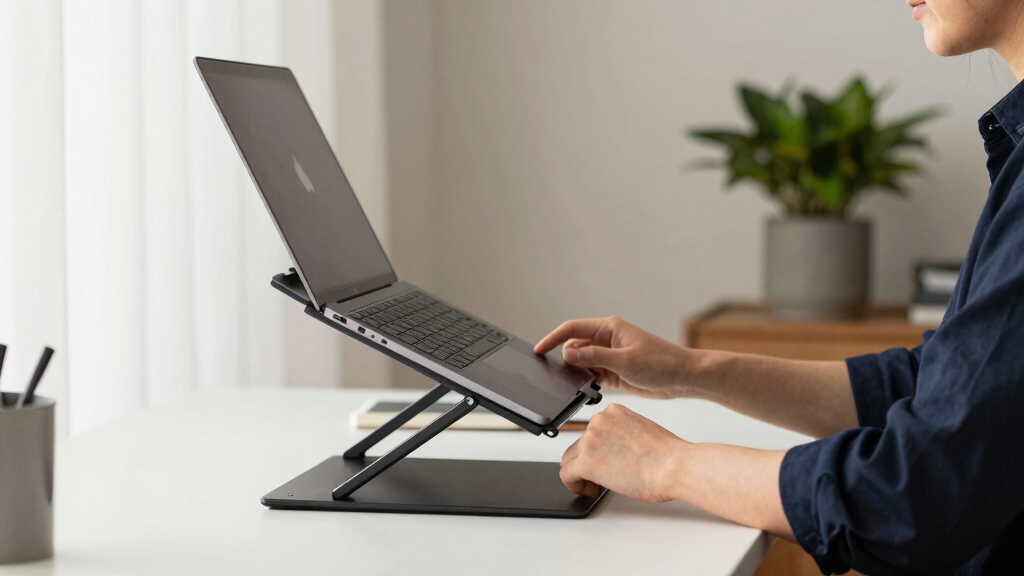
A truly ergonomic laptop stand adjusts to your body, not the other way around. Think of it as a custom-fit shoe for your workspace. When your screen is at eye level, your neck stays aligned, and your shoulders relax.
This alignment is vital because it reduces the strain on muscles and joints that are often overused during long work hours. Improper screen height can cause chronic neck and shoulder pain, headaches, and decreased productivity. An ergonomic stand’s adjustability — including height, tilt, and rotation — allows you to customize the setup to your unique body dimensions and work habits. The tradeoff, however, is that more adjustable models can be pricier and sometimes bulkier, so balancing features with portability and budget is essential. Choosing a stand that supports your natural posture encourages sustained comfort and minimizes the risk of musculoskeletal issues over time.

Gogoonike Adjustable Laptop Stand for Desk, Metal Foldable Laptop Riser Holder, Portable Desktop Book Stands, Ventilated Cooling Computer Notebook Stand Compatible with 10-15.6” Laptops
【Adjustable & Ergonomic】:This laptop stand can be adjusted to a comfortable height and angle according to your actual…
As an affiliate, we earn on qualifying purchases.
As an affiliate, we earn on qualifying purchases.
Top 5 Features to Look for When Picking a Stand That Supports Your Posture
- Adjustability: Opt for stands that allow you to modify height, tilt, and rotation. This flexibility lets you tailor your workspace to your specific body dimensions, reducing strain and discomfort. For example, if you switch between sitting and standing, a stand with smooth height adjustment becomes invaluable.
- Material & Stability: Durable materials like aluminum or bamboo not only support your device securely but also prevent wobbling that can cause strain or accidents. Stability ensures your focus remains on your work, not on balancing your equipment.
- Portability: Lightweight, foldable designs enable you to create ergonomic setups anywhere — whether at home, in a coffee shop, or traveling. This versatility encourages consistent posture support across different environments.
- Cooling & Ventilation: Open designs or integrated fans help dissipate heat, preventing overheating that can slow down your device and cause discomfort. Proper cooling maintains your laptop’s performance and your comfort during extended use.
- Compatibility & Space: Ensure the stand fits your laptop size and leaves room for a mouse or external keyboard. A well-designed stand integrates seamlessly into your workspace, avoiding clutter and promoting a more natural, ergonomic typing and viewing angle.
portable laptop stand with cooling fan
As an affiliate, we earn on qualifying purchases.
As an affiliate, we earn on qualifying purchases.
How Recent Tech Is Making Ergonomic Stands Smarter and Greener
Smart, adjustable stands are transforming the game. Imagine a stand with a motorized height adjustment you control via a remote — no more manual fiddling. These features allow you to quickly switch between sitting and standing positions, promoting movement and reducing static posture-related discomfort. Some advanced models use sensors to detect your posture and automatically adjust height or tilt, encouraging healthier habits without requiring constant manual input.
Eco-friendly materials are also on the rise. Brands now offer stands made from recycled plastics or sustainably sourced bamboo, which reduces environmental impact. Choosing such stands supports your health and aligns with eco-conscious values, making your purchase more meaningful. Hybrid and modular stands are also gaining popularity, allowing you to customize your setup with attachable monitor arms or keyboard trays. These innovations turn a simple stand into a comprehensive ergonomic workstation, helping you optimize your workspace for health, efficiency, and sustainability.
eco-friendly bamboo laptop stand
As an affiliate, we earn on qualifying purchases.
As an affiliate, we earn on qualifying purchases.
Comparison Table: Which Type of Stand Fits Your Lifestyle?
| Feature | Basic | Premium | Smart |
|---|---|---|---|
| Adjustability | Limited (fixed height) | Full tilt & height | Motorized, automatic |
| Materials | Plastic or basic metal | Aluminum, bamboo | Eco-friendly, high-tech composites |
| Portability | Lightweight, foldable | Moderate | Often portable but heavier |
| Cooling | None | Passive venting | Built-in fans |
| Best for | Budget users | Office & home professionals | Tech-savvy, health-focused users |
motorized height adjustable laptop stand
As an affiliate, we earn on qualifying purchases.
As an affiliate, we earn on qualifying purchases.
Simple Steps to Pick the Perfect Ergonomic Stand for You
- Assess your workspace and note your current pain points.
- Decide your budget — there are solid options from $30 to $200+.
- Prioritize features: Do you need full adjustability or just basic elevation?
- Measure your laptop size to ensure compatibility.
- Read reviews and watch demo videos to see how easy it is to use.
- Test the stand if possible — comfort is everything.
Why Your Workspace Deserves an Ergonomic Laptop Stand
Imagine finishing a workday and feeling only mild fatigue, not the usual neck ache or eye strain. That’s the power of a good stand. It’s like giving your body a gentle reminder to stay aligned, reducing stress on your neck, shoulders, and eyes.
Plus, a stand boosts your productivity. With your screen at eye level, you spend less time adjusting and more time focusing. It’s a small change with a big payoff.
And if you’re working from a cramped apartment or coffee shop, portable stands make it easy to create a comfortable setup anywhere. Your workspace becomes a health-supporting zone, not a pain zone.
Frequently Asked Questions
Why should I use an ergonomic laptop stand?
An ergonomic stand helps align your screen with your eyes, reducing neck, shoulder, and eye strain. It also encourages better posture, which can prevent long-term discomfort and boost your focus.How do I choose the right ergonomic stand for my needs?
Start by assessing your workspace and pain points. Consider adjustability, size, portability, and extra features like cooling. Reading reviews and trying a demo can also help ensure a good fit.Are there budget-friendly options?
Absolutely. Many affordable stands around $30 to $60 offer basic height and tilt adjustments. They provide significant ergonomic benefits without breaking the bank.Can a laptop stand improve my productivity?
Yes. When your workspace is ergonomically optimized, you experience less fatigue and fewer distractions from discomfort, allowing you to focus longer and work more efficiently.What are the best materials for ergonomic stands?
Materials like aluminum and bamboo combine durability, aesthetic appeal, and eco-friendliness. They support your laptop securely and last through years of use.Conclusion
Investing in an ergonomic laptop stand isn’t just about comfort — it’s about reclaiming your health during long hours at your desk. A well-chosen stand gently guides your posture, reducing pain and boosting focus.
Imagine your workspace as a sanctuary where your body feels supported, not strained. The right stand can turn that vision into reality — so pick wisely, and sit comfortably into your productive future.