For authorized wireless security work, the ALFA AWUS036ACH-C is my best overall pick for its dual-band support and USB-C connection. The AWUS036ACM stands out if you want two detachable antennas, while the AWUS036AXM and AWUS036AXML offer Wi-Fi 6E for buyers whose operating system and tools support their capabilities. The main tradeoffs are compatibility with your system and testing software, antenna flexibility, and whether newer band support is useful for your environment. I rank these adapters by practical fit for authorized testing, not by wireless generation alone. Read on for the full comparison and help choosing the right Alfa model for your setup.

Get health and wellness essentials delivered free with Prime
- Fast, free delivery on millions of items
- Prime Video, Amazon Music and more included
- Member-only deals all year
Key Takeaways
- The AWUS036ACH-C is my overall pick for balancing dual-band coverage with a USB-C connection; confirm that your computer and testing tools support it before buying.
- The AWUS036ACM prioritizes antenna flexibility with two detachable antennas, a useful distinction when placement or antenna swaps matter more than a compact design.
- The AWUS036AXM and AWUS036AXML are the Wi-Fi 6E choices, but newer band support only helps when your hardware, software, and authorized test environment can use it.
- External-antenna models suit different setups: the AWUS036AC is described with a high-sensitivity antenna, while another AC1200 option includes two 5 dBi antennas.
- The AWUS036ACS is the compact, lower-spec option in this lineup; its AC600 designation makes it a different fit from the AC1200 and AXE3000 models.
| ALFA Network AWUS036ACH-C Dual-Band USB-C Wi-Fi Adapter |  | Best for USB-C Setups | Model: AWUS036ACH-C | Wireless standards: IEEE 802.11ac/a/b/g/n | Frequency bands: 2.4 GHz and 5 GHz | VIEW ON AMAZON | See Our Full Breakdown |
| ALFA AWUS036AXM WiFi 6E USB 3.0 Adapter, AXE3000 Tri-Band |  | Best for WiFi 6E Testing | Model: AWUS036AXM | Wi-Fi standard: WiFi 6E | Bands: 2.4 GHz, 5 GHz, and 6 GHz | VIEW ON AMAZON | See Our Full Breakdown |
| ALFA Network AWUS036AC Long-Range Dual-Band AC1200 USB Wi-Fi Adapter with High-Sensitivity External Antenna (Windows, macOS & Kali Linux Supported) |  | Best for Kali Linux Compatibility | Model: AWUS036AC | Wireless standard: 802.11ac, dual-band AC1200 | Maximum data rate: 867 Mbps (5 GHz); 300 Mbps (2.4 GHz) | VIEW ON AMAZON | See Our Full Breakdown |
| Alfa Long-Range Dual-Band AC1200 Wireless USB 3.0 Wi-Fi Adapter with 2x 5dBi External Antennas |  | Best for Antenna Flexibility | Model: AWUS036ACH | Wi-Fi standard: 802.11ac/a/b/g/n | Frequency bands: 2.4 GHz and 5 GHz | VIEW ON AMAZON | See Our Full Breakdown |
| ALFA Network AWUS036ACS AC600 Dual-Band USB Wi-Fi Adapter |  | Best Compact Pick | Model: AWUS036ACS | Wi-Fi standard: 802.11ac | Frequency bands: 2.4 GHz and 5 GHz | VIEW ON AMAZON | See Our Full Breakdown |
| Alfa Network AC1200 Dual-Band WiFi USB Adapter (867 Mbps) for Laptop/Desktop – Windows, Mac, Linux |  | Best for Straightforward AC1200 Upgrades | Interface: USB 3.0 | Wireless standards: 802.11a/b/g/n/ac | Maximum listed data rate: 867 Mbps | VIEW ON AMAZON | See Our Full Breakdown |
| ALFA Network AWUS036ACM Dual-Band AC1200 USB Wi-Fi Adapter with Two Detachable Antennas | 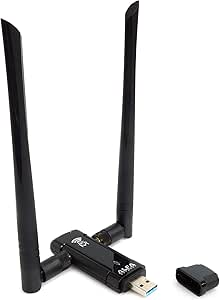 | Best for Chipset-Specific Linux Research | Model: AWUS036ACM | Chipset: MediaTek MT7612U | Wireless standards: 802.11a/b/g/n/ac | VIEW ON AMAZON | See Our Full Breakdown |
| ALFA Network AWUS036AXML Wi-Fi 6E USB 3.0 Adapter, AXE3000 Tri-Band |  | Best for Wi-Fi 6E Lab Coverage | Model: AWUS036AXML | Wi-Fi standard: Wi-Fi 6E (802.11ax) | Bands: 2.4 GHz, 5 GHz, and 6 GHz | VIEW ON AMAZON | See Our Full Breakdown |
| wifi pentest adapters alfa | Interface | Model | Antennas | Dimensions |
|---|---|---|---|---|
| ALFA Network AWUS036ACH-C Dual | USB 3.0 Type-C | AWUS036ACH-C | Two detachable dual-band high-gain antennas | 3.35 x 2.48 x 0.79 in |
| ALFA AWUS036AXM WiFi 6E USB 3. | USB 3.0, backward compatible with USB 2.0 | AWUS036AXM | Two detachable 5 dBi antennas | — |
| ALFA Network AWUS036AC Long-Ra | USB 3.0 | AWUS036AC | — | 3.39 x 0.98 x 0.51 in |
| Alfa Long-Range Dual-Band AC12 | USB 3.0 Type-C | AWUS036ACH | Two external 5 dBi antennas | 5.51 x 5.51 x 2.36 in |
| ALFA Network AWUS036ACS AC600 | USB 2.0 | AWUS036ACS | — | 2.17 x 0.39 x 0.98 in |
| Alfa Network AC1200 Dual-Band | USB 3.0 | — | Two removable 5 dBi dual-band antennas | 86.6 × 26 × 22.3 mm |
| ALFA Network AWUS036ACM Dual-B | USB 3.0 | AWUS036ACM | Two detachable 5 dBi antennas | 2.44 × 0.94 × 3.36 in |
| ALFA Network AWUS036AXML Wi-Fi | USB 3.0 | AWUS036AXML | Two detachable 5 dBi antennas | — |
More Details on Our Top Picks
ALFA Network AWUS036ACH-C Dual-Band USB-C Wi-Fi Adapter
The AWUS036ACH-C is the clearest fit here for a laptop or workstation that needs a native USB-C connection and dual-band coverage. Its 2.4 GHz and 5 GHz support, paired with two detachable high-gain antennas, gives it more flexibility for authorized wireless testing than the smaller, lower-speed AWUS036ACS. The tradeoff is that its 802.11ac performance is less current than the WiFi 6E AWUS036AXM, which adds a 6 GHz band for compatible networks. Operating-system support is a bigger limitation: the listed macOS ceiling is 10.15, with no M1 or M2 support, so newer Mac owners should look elsewhere. I’d choose this model when USB-C convenience matters more than next-generation band support.
Pros:- USB-C interface suits newer laptops without relying on a USB-A port.
- Two detachable dual-band high-gain antennas allow antenna changes.
- Supports both 2.4 GHz and 5 GHz networks.
- Listed Linux support begins at kernel 4.19.
Cons:- macOS support is limited to versions up to 10.15.
- No listed support for Apple M1 or M2 Macs.
- Does not offer WiFi 6E or 6 GHz connectivity.
Best for: Windows or Linux users with a USB-C laptop who want dual-band coverage and detachable antennas for authorized Wi-Fi testing.
Not ideal for: Owners of newer Macs, especially M1 or M2 systems, and testers who need WiFi 6E or 6 GHz support.
- Model:AWUS036ACH-C
- Wireless standards:IEEE 802.11ac/a/b/g/n
- Frequency bands:2.4 GHz and 5 GHz
- Maximum data rate:300 Mbps (2.4 GHz); 867 Mbps (5 GHz)
- Interface:USB 3.0 Type-C
- Antennas:Two detachable dual-band high-gain antennas
- Operating-system support:Windows Vista, 7, 8/8.1, 10; Linux kernel 4.19 or later; macOS up to 10.15
- Dimensions:3.35 x 2.48 x 0.79 in
Our verdict“Choose the AWUS036ACH-C for a USB-C Windows or Linux setup that needs detachable dual-band antennas, but not for newer Macs or 6 GHz testing.”
ALFA AWUS036AXM WiFi 6E USB 3.0 Adapter, AXE3000 Tri-Band
For an authorized assessment that includes newer wireless networks, the AWUS036AXM stands apart from the 802.11ac models in this group: it adds 2.4, 5, and 6 GHz bands and lists rates up to 3 Gbps. That makes it the forward-looking pick, but only when the host system and test network can use those capabilities. Access to 6 GHz calls for Windows 11 or Linux plus a WiFi 6E router; the AWUS036ACH-C and AWUS036AC offer broader older-generation dual-band coverage instead. The AXM also has no support for newer macOS or M1/M2 Macs, and it is not intended for phones or televisions. I’d rank it first for 6E-focused work, not as the easiest all-purpose choice.
Pros:- Tri-band support includes the 6 GHz band.
- Maximum listed data rate reaches 3 Gbps.
- Two detachable 5 dBi antennas provide antenna flexibility.
- USB 3.0 connection is backward compatible with USB 2.0.
Cons:- 6 GHz use requires a WiFi 6E router and Windows 11 or Linux.
- No listed support for newer macOS versions or M1/M2 Macs.
- Not compatible with cell phones or televisions.
Best for: Windows 11 or newer-Linux users conducting authorized tests on WiFi 6E networks with access to a compatible router.
Not ideal for: Mac users, mobile-device owners, or testers whose networks and workflows are limited to 2.4 and 5 GHz.
- Model:AWUS036AXM
- Wi-Fi standard:WiFi 6E
- Bands:2.4 GHz, 5 GHz, and 6 GHz
- Maximum data rate:Up to 3 Gbps
- Interface:USB 3.0, backward compatible with USB 2.0
- Antennas:Two detachable 5 dBi antennas
- Supported operating systems:Windows 10, Windows 11, and newer Linux kernels
- 6 GHz requirement:WiFi 6E router and Windows 11 or Linux
Our verdict“Pick the AWUS036AXM when your authorized testing specifically involves WiFi 6E and a supported Windows or Linux host.”
ALFA Network AWUS036AC Long-Range Dual-Band AC1200 USB Wi-Fi Adapter with High-Sensitivity External Antenna (Windows, macOS & Kali Linux Supported)
The AWUS036AC is a practical pick for buyers who value stated Kali Linux compatibility and a high-sensitivity external antenna over the latest bands. Its 867 Mbps 5 GHz and 300 Mbps 2.4 GHz figures match the dual-band class of the AWUS036ACH-C, while the included USB 3.0 cradle can help position the adapter away from a computer’s chassis. Unlike the AWUS036AXM, it has no 6 GHz capability, and its listed macOS range stops at 10.13, so it is not a strong choice for modern Mac workflows. The product data also identifies USB 3.0 as important for optimal performance. I’d favor it for a compatible Windows or Linux test machine where antenna placement and legacy OS coverage matter more than WiFi 6E.
Pros:- Product data lists Linux and Kali Linux compatibility.
- Dual-band rates reach 867 Mbps on 5 GHz and 300 Mbps on 2.4 GHz.
- High-sensitivity external antenna is suited to range-oriented setups.
- USB 3.0 cradle offers flexibility in adapter placement.
Cons:- Listed macOS support ends at version 10.13.
- No WiFi 6E or 6 GHz support, unlike the AWUS036AXM.
- USB 3.0 is needed for optimal performance.
Best for: Kali Linux users and Windows operators seeking a dual-band adapter with an external antenna and USB 3.0 cradle.
Not ideal for: Users needing 6 GHz testing, recent macOS support, or a compact adapter with no separate cradle.
- Model:AWUS036AC
- Wireless standard:802.11ac, dual-band AC1200
- Maximum data rate:867 Mbps (5 GHz); 300 Mbps (2.4 GHz)
- Interface:USB 3.0
- Antenna:High-sensitivity dual-band external antenna
- Included accessory:USB 3.0 cradle
- Compatible operating systems:Windows XP–10, macOS 10.4–10.13, Linux, Kali Linux
- Dimensions:3.39 x 0.98 x 0.51 in
Our verdict“Choose the AWUS036AC for Kali-oriented dual-band work when its older macOS limits and USB 3.0 requirement fit your setup.”
Alfa Long-Range Dual-Band AC1200 Wireless USB 3.0 Wi-Fi Adapter with 2x 5dBi External Antennas
This AWUS036ACH is the antenna-focused option in this set: its two external 5 dBi antennas and built-in signal amplifier make it a better match for a fixed bench setup than the compact AWUS036ACS. It retains familiar 802.11ac dual-band rates—300 Mbps on 2.4 GHz and 867 Mbps on 5 GHz—so it does not bring the 6 GHz reach of the AWUS036AXM. The tradeoff is physical bulk: the external antennas and listed dimensions make it less convenient to carry between test locations. OS details also skew old, with macOS support listed only through 10.12 and Windows through 10. I’d choose it when antenna placement and dual-band range are the priority, after checking driver support for the intended host.
Pros:- Two external 5 dBi antennas support flexible placement.
- Built-in signal amplifier is aimed at extending coverage.
- Dual-band support covers 2.4 GHz and 5 GHz.
- USB 3.0 Type-C interface.
Cons:- External antennas and body make it bulky for portable use.
- Listed macOS compatibility stops at 10.12.
- No 6 GHz band, unlike the AWUS036AXM.
Best for: Authorized-test operators building a stationary Windows or Linux setup who want two external antennas for flexible placement.
Not ideal for: Traveling testers, newer Mac owners, or anyone seeking WiFi 6E and 6 GHz support.
- Model:AWUS036ACH
- Wi-Fi standard:802.11ac/a/b/g/n
- Frequency bands:2.4 GHz and 5 GHz
- Data rates:300 Mbps (2.4 GHz); 867 Mbps (5 GHz)
- Interface:USB 3.0 Type-C
- Antennas:Two external 5 dBi antennas
- Compatible operating systems:Windows XP–10, macOS 10.4–10.12, Linux
- Dimensions:5.51 x 5.51 x 2.36 in
Our verdict“Pick this AWUS036ACH for a stationary dual-band setup where external antenna flexibility matters more than portability or current macOS support.”
ALFA Network AWUS036ACS AC600 Dual-Band USB Wi-Fi Adapter
The AWUS036ACS is the portability-first choice: its small body and single external antenna are easier to fit into a laptop kit than the two-antenna AWUS036ACH-C or the larger AWUS036ACH. It still covers both 2.4 and 5 GHz, but its 433 Mbps maximum on 5 GHz and 150 Mbps on 2.4 GHz are well below those models’ listed rates. That makes it a sensible option for basic, authorized dual-band checks where size matters more than throughput or antenna options. It uses USB 2.0, and the listing flags driver support as a requirement, so I would verify compatibility before relying on it with a particular Linux distribution or macOS version. Skip it for 6 GHz work; the AWUS036AXM is the clear step up there.
Pros:- Compact dimensions suit portable laptop kits.
- Supports both 2.4 GHz and 5 GHz bands.
- External antenna is designed to improve signal coverage.
- Listed compatibility includes Windows, macOS, and Linux.
Cons:- Maximum listed rates are lower than the AC1200 adapters in this roundup.
- USB 2.0 interface rather than USB 3.0.
- Driver support must be confirmed for the target operating system.
Best for: Laptop-based testers who need a compact dual-band adapter for basic authorized checks and can confirm driver support beforehand.
Not ideal for: Users who need higher listed throughput, detachable antenna choices, USB 3.0, or WiFi 6E coverage.
- Model:AWUS036ACS
- Wi-Fi standard:802.11ac
- Frequency bands:2.4 GHz and 5 GHz
- Maximum data rate:433 Mbps
- Band-specific rates:150 Mbps (2.4 GHz); 433 Mbps (5 GHz)
- Interface:USB 2.0
- Antenna:One external high-sensitivity antenna
- Compatible operating systems:Windows, macOS, Linux
- Dimensions:2.17 x 0.39 x 0.98 in
Our verdict“Choose the AWUS036ACS when compact size outweighs speed and you have verified driver support for your test machine.”
Alfa Network AC1200 Dual-Band WiFi USB Adapter (867 Mbps) for Laptop/Desktop – Windows, Mac, Linux
This AC1200 adapter suits buyers who want a familiar dual-band connection and removable antennas without moving to a newer Wi-Fi generation. Its USB 3.0 interface and listed support for Windows, macOS, and Linux make it a flexible choice for adding wireless connectivity to a desktop or improving a laptop’s link. The two detachable 5 dBi antennas offer more flexibility than the compact AWUS036ACS, though they add some bulk and do not by themselves guarantee better reception in every setup. Compared with the AWUS036ACM, this listing gives less chipset detail, so buyers choosing specifically for a chipset-dependent Linux workflow may prefer that clearer specification. It is an AC option, not a dedicated monitor-mode or injection guarantee: check chipset, driver, and operating-system support for your intended authorized testing tasks before buying.
Pros:- Dual-band 802.11ac support with a listed rate up to 867 Mbps
- Two removable 5 dBi antennas allow antenna replacement or repositioning
- USB 3.0 interface
- Listed compatibility includes Windows, macOS, and Linux
Cons:- The product data does not identify a chipset, making tool and driver compatibility harder to verify
- No explicit monitor-mode or packet-injection support is stated
- The external antennas make it less compact than small USB adapters
Best for: Linux or Windows users seeking an AC1200 USB adapter with removable antennas for general connectivity and authorized lab work, who will verify driver support for their tools.
Not ideal for: Buyers who need confirmed monitor-mode or packet-injection support, or who want Wi-Fi 6E and a clearly identified chipset.
- Interface:USB 3.0
- Wireless standards:802.11a/b/g/n/ac
- Maximum listed data rate:867 Mbps
- Bands:Dual-band
- Antennas:Two removable 5 dBi dual-band antennas
- Compatible operating systems:Windows XP–8.1, macOS 10.5+, Linux
- Dimensions:86.6 × 26 × 22.3 mm
- Weight:50 g
Our verdict“Choose this for a flexible, removable-antenna AC1200 adapter, but verify chipset and Linux driver support before relying on it for pentest workflows.”
ALFA Network AWUS036ACM Dual-Band AC1200 USB Wi-Fi Adapter with Two Detachable Antennas
The AWUS036ACM earns its place for buyers who want more than a generic AC1200 label: its MediaTek MT7612U chipset is identified, giving Linux users a more concrete starting point for checking kernel and tool compatibility. It still offers the same broad class of dual-band AC connectivity as the B07Q5NRYBP, including two detachable 5 dBi antennas and USB 3.0, but its listed operating-system range is more explicit: Windows support stops at Windows 10, while Linux is listed from kernel 2.6 onward. That makes it a more informed choice for a Linux lab than the less specifically documented AC1200 model, not a blanket promise of monitor mode or injection support. Buyers focused on 6 GHz should instead look at the AWUS036AXML, accepting its newer hardware and different compatibility requirements.
Pros:- MediaTek MT7612U chipset is identified in the product data
- Dual-band operation with listed rates up to 300 Mbps on 2.4 GHz and 867 Mbps on 5 GHz
- Two detachable 5 dBi antennas
- USB 3.0 connection and listed Linux support
Cons:- Windows compatibility is listed only through Windows 10
- Product details do not explicitly confirm monitor mode or packet injection
- AC Wi-Fi lacks the 6 GHz band available on the AWUS036AXML
Best for: Linux lab users who want an AC1200 adapter with a named chipset and are prepared to confirm current driver support for their distribution and testing tools.
Not ideal for: Users who need stated Windows 11 support, verified monitor-mode or injection behavior, or access to 6 GHz networks.
- Model:AWUS036ACM
- Chipset:MediaTek MT7612U
- Wireless standards:802.11a/b/g/n/ac
- Bands and maximum listed rates:2.4 GHz: 300 Mbps; 5 GHz: 867 Mbps
- Interface:USB 3.0
- Antennas:Two detachable 5 dBi antennas
- Supported operating systems:Windows XP through Windows 10, macOS 10.9 or later, Linux kernel 2.6 or later
- Dimensions:2.44 × 0.94 × 3.36 in
Our verdict“Pick the AWUS036ACM when a named chipset helps your Linux compatibility research; skip it if you need newer-band support or clearly stated testing modes.”
ALFA Network AWUS036AXML Wi-Fi 6E USB 3.0 Adapter, AXE3000 Tri-Band
The AWUS036AXML is the forward-looking pick in this group: its Wi-Fi 6E tri-band support adds 6 GHz access alongside 2.4 and 5 GHz, a capability neither AC1200 adapter provides. The listed combined throughput of up to 3000 Mbps is a headline figure across bands, not a guarantee for one connection or a measure of pentest compatibility. Its MediaTek MT7921AU chipset gives buyers a useful detail to investigate, but the product data only lists Linux and Windows, with Ubuntu 20.04 and Windows 10 as minimum requirements. By comparison, the AWUS036ACM has an explicitly stated Linux kernel range and may be easier to evaluate for older setups. Choose this model for a compatible 6E environment, not simply because a newer standard guarantees monitor mode or injection; those capabilities need separate verification.
Pros:- Tri-band support includes the 6 GHz band
- MediaTek MT7921AU chipset is specified
- Two detachable 5 dBi antennas
- USB 3.0 interface with Linux and Windows compatibility listed
Cons:- Minimum listed operating systems are Ubuntu 20.04 and Windows 10, limiting older-system use
- No explicit monitor-mode or packet-injection support is stated
- The 3000 Mbps figure is combined throughput and does not describe a single-band connection
Best for: Linux or Windows lab users with compatible Wi-Fi 6E access points who want to examine 2.4, 5, and 6 GHz networks and can verify driver support beforehand.
Not ideal for: Users with older operating systems, AC-only testing needs, or workflows that require confirmed monitor-mode and packet-injection support.
- Model:AWUS036AXML
- Wi-Fi standard:Wi-Fi 6E (802.11ax)
- Bands:2.4 GHz, 5 GHz, and 6 GHz
- Maximum combined throughput:3000 Mbps
- Chipset:MediaTek MT7921AU
- Interface:USB 3.0
- Antennas:Two detachable 5 dBi antennas
- Compatible operating systems:Linux and Windows; minimum listed: Ubuntu 20.04 and Windows 10
- Weight:0.22 kg
Our verdict“Choose the AWUS036AXML for a compatible 6E lab and broader band coverage, but verify Linux driver and testing-mode support before purchase.”

How We Picked
I ranked these Alfa Wi-Fi adapters for authorized security testing by the factors most likely to affect a buyer’s setup: stated wireless bands and generation, connection type, antenna arrangement, and the clarity of the product’s compatibility claims. I gave weight to practical differences, such as USB-C versus USB 3.0, detachable antennas, and a compact versus external-antenna design. Product names and supplied descriptions do not establish chipset details, monitor-mode support, packet injection support, or compatibility with every version of Kali Linux and other tools, so I treat those as items buyers must verify rather than guaranteed features.
The AWUS036ACH-C ranks first as a balanced dual-band option with a USB-C connector. The AWUS036ACM follows for its two detachable antennas, while the Wi-Fi 6E adapters rank highly for buyers with a matching, verified setup—not as universal upgrades. The external-antenna AC1200 models and the smaller AC600 adapter serve more specific needs, so their place depends on range, portability, and system compatibility. I do not infer performance from model names or advertised link rates alone.
| wifi pentest adapters alfa | Interface | Antennas | Compatible operating systems |
|---|---|---|---|
| ALFA Network AWUS036ACH-C Dual | USB 3.0 Type-C | Two detachable dual-band high-gain antennas | — |
| ALFA AWUS036AXM WiFi 6E USB 3. | USB 3.0, backward compatible with USB 2.0 | Two detachable 5 dBi antennas | — |
| ALFA Network AWUS036AC Long-Ra | USB 3.0 | — | Windows XP–10, macOS 10.4–10.13, Linux, Kali Linux |
| Alfa Long-Range Dual-Band AC12 | USB 3.0 Type-C | Two external 5 dBi antennas | Windows XP–10, macOS 10.4–10.12, Linux |
| ALFA Network AWUS036ACS AC600 | USB 2.0 | — | Windows, macOS, Linux |
| Alfa Network AC1200 Dual-Band | USB 3.0 | Two removable 5 dBi dual-band antennas | Windows XP–8.1, macOS 10.5+, Linux |
| ALFA Network AWUS036ACM Dual-B | USB 3.0 | Two detachable 5 dBi antennas | — |
| ALFA Network AWUS036AXML Wi-Fi | USB 3.0 | Two detachable 5 dBi antennas | Linux and Windows; minimum listed: Ubuntu 20.04 and Windows 10 |
Factors to Consider When Choosing Wifi Pentest Adapters Alfa
Before choosing an adapter, match it to the authorized test environment and the software you plan to run. A newer wireless generation or a larger antenna setup may not help if your operating system cannot use the adapter’s chipset or required testing features. These broader checks can prevent a mismatch that model comparisons alone cannot resolve.
Verify chipset and tool support before buying
Model names and broad compatibility statements are not enough to confirm support for a specific security-testing workflow. Check the chipset revision and current driver support against the operating system and tools you intend to use. Look for evidence of support for the exact features you need, such as monitor mode, rather than assuming that “Kali Linux supported” covers every release or function. A hardware revision can matter even when the retail model name stays the same. If the seller does not identify the chipset clearly, ask before purchase or choose a source that provides revision details. This check can matter more than choosing between AC1200 and Wi-Fi 6E.
Choose bands for the networks you are authorized to assess
Dual-band adapters cover 2.4 GHz and 5 GHz environments, while the AXE3000-labelled options in this roundup are presented as tri-band Wi-Fi 6E devices. Extra band support is useful only if the access points, client devices, local rules, and test software all match. Do not assume that a newer generation automatically improves testing results or works with every workflow. Check the adapter’s published band details and regional limitations, then compare them with the scope of your authorized assessment. If your work is limited to existing 2.4 GHz and 5 GHz networks, a compatible dual-band model may be the more practical choice. Prioritize actual environment coverage over a generation label.
Treat antenna design as a setup choice, not a guarantee
External antennas can give you more options for placement, and detachable antennas can make swaps possible where the design and connector allow it. They do not guarantee better results in every room or at every distance; walls, interference, orientation, and the adapter’s radio design all affect reception. A compact adapter may be easier to carry and less exposed to knocks, while larger antenna hardware can occupy more space and be less convenient on a laptop. Avoid comparing antenna gain figures alone, especially when product descriptions do not specify measurement conditions. Choose the arrangement that suits your workspace and authorized test layout. Confirm whether replacement antennas are compatible before planning a custom setup.
Match the connector and physical design to your computer
The AWUS036ACH-C’s USB-C connection can suit newer laptops, while USB 3.0 models may fit computers with standard USB-A ports or a suitable adapter. Connector type affects convenience, but it does not confirm wireless-tool compatibility or radio performance. Consider port placement, nearby devices, and whether an adapter or hub could block neighboring connections. Larger adapters and external antennas can be awkward on a thin laptop during mobile work. A short extension cable can sometimes improve placement, though it adds another item to carry and should not be treated as a radio upgrade. Check both connector fit and the computer’s available power and port configuration.
Compare stated link rates with the work you actually need to do
Labels such as AC600, AC1200, and AXE3000 describe product classes or advertised capabilities, not a promise of real-world speed in a testing session. Wireless conditions, the access point, drivers, and the computer all shape results. For many security tasks, reliable driver behavior and the required radio modes matter more than a headline throughput figure. Paying for a newer adapter makes sense when its bands or features are supported and relevant to your work. If those conditions are not met, a simpler compatible model may be a better fit. Base your choice on verified capabilities rather than the largest number printed in a product name.
Plan for drivers, operating-system changes, and revisions
Linux kernel updates and driver changes can affect whether an adapter behaves as expected over time. Before committing, check recent documentation for the exact chipset and operating-system version, not only a general product compatibility list. Keep the original packaging and note the hardware revision in case support differs from a guide written for an earlier unit. If you need dependable field use, test installation and required functions in your own authorized lab before relying on the adapter. A model with clearer driver documentation may be less work than one with a more advanced radio. This maintenance step is easy to overlook when shopping by specifications alone.
Frequently Asked Questions
Which Alfa adapter should I choose if I use Kali Linux?
Start with the exact chipset and hardware revision, then check current driver documentation for your Kali release and required features. A broad claim of Kali compatibility does not confirm support for monitor mode or every security-testing tool. The product descriptions in this lineup do not provide enough detail to guarantee those functions across all models. Ask the seller for the revision and chipset if they are not listed, and compare that information with a current support source. Test the adapter in an authorized lab before depending on it for scheduled work.
Is a Wi-Fi 6E Alfa adapter automatically the best choice for pentesting?
No. The AWUS036AXM and AWUS036AXML are the Wi-Fi 6E-labelled options here, but their newer band support only helps when your system and authorized test environment can use it. You still need to confirm chipset drivers and the wireless functions your tools require. A compatible dual-band adapter may be more useful than a newer model that lacks support for your workflow. Check the access points and bands in scope before paying for additional capability. Choose Wi-Fi 6E for a verified need, not just because the generation is newer.
Should I pick the AWUS036ACM or an Alfa model with external antennas?
The AWUS036ACM is the clearer choice if two detachable antennas are central to your setup, while the AWUS036AC description calls out a high-sensitivity external antenna and another AC1200 listing specifies two 5 dBi antennas. Compare the included antenna arrangement and confirm whether antennas can be replaced or repositioned as you expect. The product descriptions do not make these designs interchangeable, and antenna count alone cannot predict reception in your space. Think about portability and placement as well as the stated antenna details. Verify chipset support separately, since antenna features do not establish software compatibility.
When is the AWUS036ACS a sensible choice over an AC1200 adapter?
The AWUS036ACS makes sense when its compact dual-band design and AC600 class match a simpler, portable setup. It is not a like-for-like replacement for the AC1200 models if you need their stated class or an external-antenna arrangement. First check that its chipset supports your operating system and the testing features you need. Do not choose it solely because a smaller adapter looks convenient; the right fit depends on your authorized environment and workflow. If compatibility and capability details are unclear, compare exact hardware revisions before deciding.
Do I need USB-C, or is a USB 3.0 adapter a better fit?
Choose the connector that fits your computer without awkward hubs or blocked ports. The AWUS036ACH-C is the USB-C option named in this lineup, while several alternatives are listed as USB 3.0 models. Connector convenience does not confirm driver support, testing features, or better wireless performance. If your laptop has only USB-C ports, check whether a hub or adapter affects how you can position the device and antennas. If you already have usable USB-A ports, a USB 3.0 model may be simpler. Verify the precise connector and hardware revision in the listing before ordering.
Conclusion
For most buyers who have verified driver support, I recommend the AWUS036ACH-C as best overall for its dual-band capability and USB-C connection. My best value in practical fit is the AWUS036ACS for buyers who want a compact AC600 option and do not need the higher class or external antennas of the AC1200 models; value here means matching the tool to the job, not a price claim. For a premium-feature preference, look at the AWUS036AXM or AWUS036AXML only if Wi-Fi 6E is supported and useful in your environment. Beginners should prioritize the model with the clearest chipset and driver documentation rather than assuming any adapter will work seamlessly. For antenna flexibility, choose the AWUS036ACM; for a high-sensitivity or two-antenna external setup, compare the specific AC1200 listings. In every case, verify the exact revision and required wireless features before purchase.